
 Serge Dobrorez
How I built my own annotator for AI prototypes
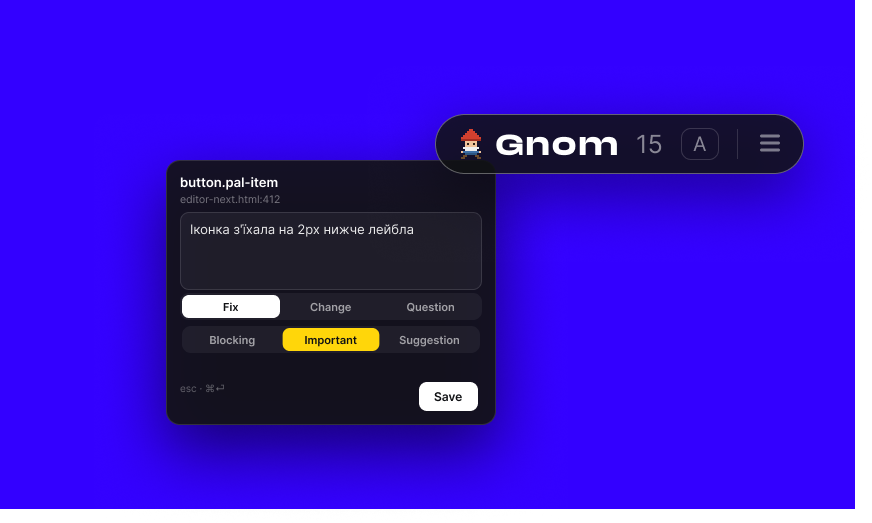
Lately I've been designing more and more directly in the browser. Not in Figma, but in a live HTML prototype: I open the page, click through the interactions, see what feels wrong, and immediately ask an agent to update the code.
At first the workflow was very simple. I'd just send commands like “reduce this spacing,” “make this button shorter,” “rework this section.” That works fine while there are only a few changes. But once the prototype gets more complex, a familiar problem appears: the agent doesn't always understand which exact element the comment refers to. “This block” is obvious to me, but not necessarily to the model.
Then I found Agentation, an annotation tool for working with AI agents. I really liked the idea: click directly on an element in the browser, leave a comment, and the agent gets the context without extra explanation. It made the workflow much faster.
But for my use case, two problems remained. The first was accuracy — sometimes the annotation would resolve to a different element than the one I actually meant. The second was tracking: once I had 10, 20 or 30 changes, it became hard to manage them as actual tasks — what the agent had already seen, what was fixed, what was blocked, and what I no longer wanted to change.
So I decided to build my own tool around the way I work. I called it Gnom.
Gnom works as a lightweight annotation layer on top of an HTML prototype. I turn it on, click the element I want to change, and leave a comment. But instead of keeping annotations as a loose collection of comments, every change goes into a single table. For each note I can see the element and its location in the code, the comment, the type of change, its priority, its status, and its current progress. In practice it becomes a small backlog wired directly to the prototype.
Another important difference is that I try to anchor the annotation not only to the element's position on screen, but also to the actual HTML fragment behind it. That makes the connection between what I point at in the browser and what the agent should change in the code much more reliable.
The workflow now looks like this: I review the prototype, leave all the annotations, review them in the table, the agent prepares a plan — and only then does it start making changes. Fewer conversations like “no, not that div.” Fewer lost comments. And it's much easier to review a large prototype in one pass.
There's also a tiny pixel gnome living in the interface. When annotation mode is off, he sleeps. When it's active, he runs. It has almost no functional value — but I'm increasingly convinced that vibe coding can be both efficient and fun. So the gnome stays.
I've also made the tool publicly available, so you can drop it into your own HTML project and use it in your own workflow.